天师

天下事有难易乎?为之,则难者亦易矣;不为,则易者亦难矣。


  • 首页

  • 分类

  • 归档

  • 标签

  • 关于

ButterKnife源码分析

发表于 2019-08-07 更新于 2019-08-14 分类于 源码分析
本文字数: 25k 阅读时长 ≈ 22 分钟

又到一年七夕节,祝愿全天下的有情人终成眷属。

一直以来项目中都是使用别人的框架,使用起来很熟练,但是源码一般都是大致粗略的看一下,弄懂整个流程就不去管他了,这段时间我都是在跟源码打交到深有体会,除非知识有一定的沉淀,否则学到的终究只是皮毛。所以打算想要学习的更深入,建议还是多多看源码,不光技术提升,对设计模式、封装思想也会有更深刻的领悟。

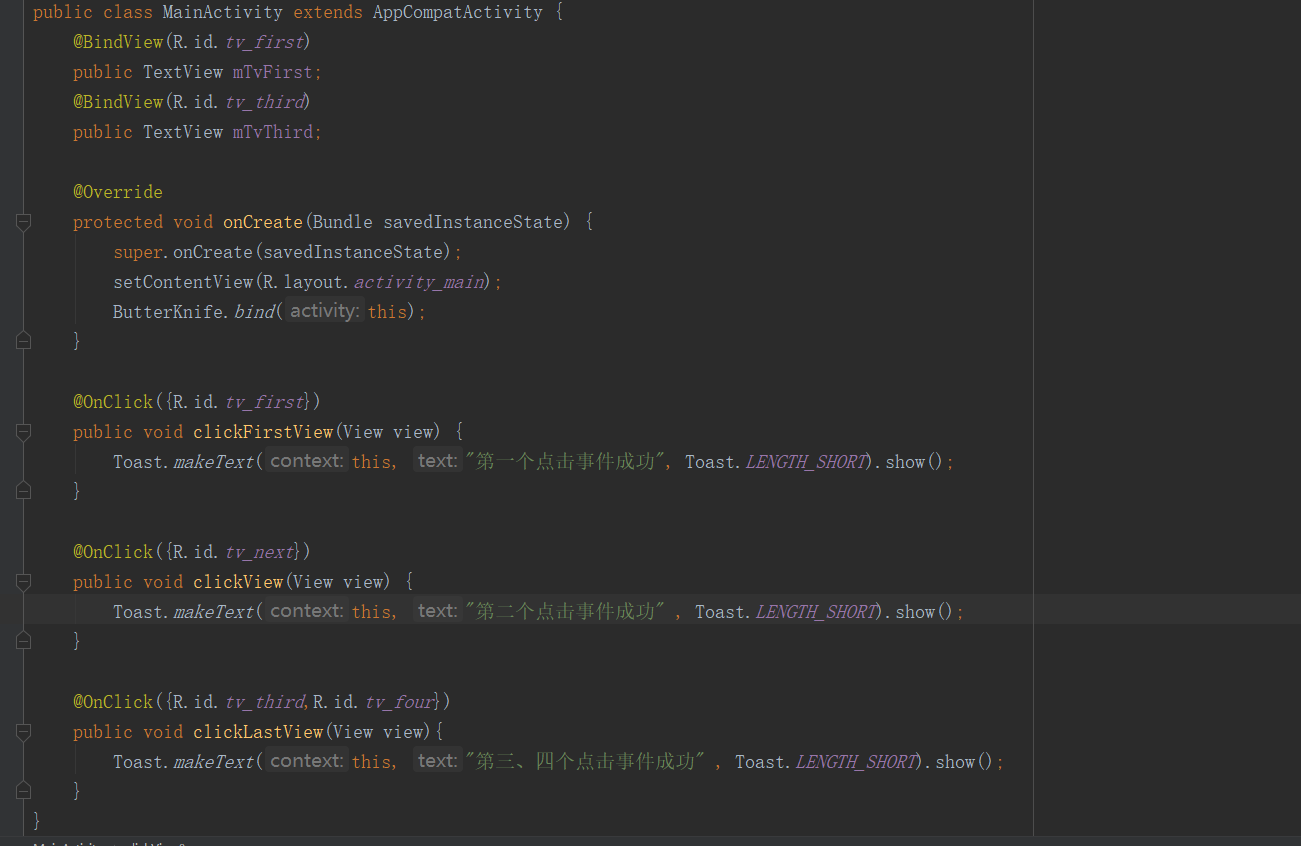
本篇文章不涉及如何自定义ButterKnifeAPT插件,如果需要请浏览我写的Demo,效果图如下:
1565162963976

基本的BindView(),以及OnClick()是没有问题的,至于其它的BindColor()原理都是一样

ButterKnife简介

ButterKnife是由Android之神JakeWharton开发出来的,通过APT在编译时期获取Java代码中相应的注解并生成对应代码,告别了传统的手动findViewById(),setOnClickListener()等,从而提升代码可读性、开发效率。

ButterKnife工作流程
流程图

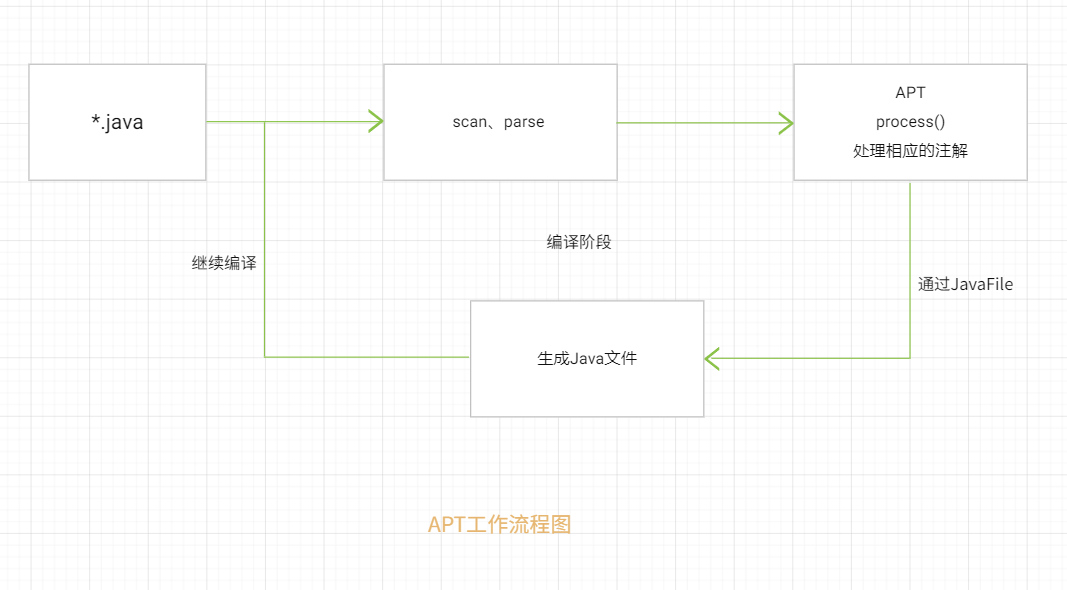
APT工作流程大致为两步:

  1. APT通过扫描解析Java源文件,获取相应的注解,并通过注解生成相应的Java文件。
  2. 生成的Java文件后继续编译,APT继续扫描,如果有相应的文件生成则继续重复此步骤。

ButterKnife源码分析

  • 首先我们看下ButterKnifeProcessor#init()初始化
1
2
3
4
5
6
7
8
9
10
11
12
13
@AutoService(Processor.class)
public final class ButterKnifeProcessor extends AbstractProcessor {
@Override
public synchronized void init(ProcessingEnvironment env) {
super.init(env);
//...省略
try {
//这里获取到抽象语法树(AST)下面简单描述一下AST
trees = Trees.instance(processingEnv);
} catch (IllegalArgumentException ignored) {
}
}
}

抽象语法树(AST): 全称为abstract synatx tree,是通过语法分析器将源代码读入、解析,并建立语法树。

这里有关于AST详细描述与简单的使用

为什么这里需要使用到AST?

我们在使用ButterKnife时,我们知道在使用一些注解时比如BindView(R.id.tv_content),其中R.id.tv_content 必须是常量,但是在我们library项目中所有生成的资源ID是静态变量,这也是为什么我们在library中资源文件为什么不能使用switch-case的原因。从而导致了ButterKnife不能正常使用。

为了解决该问题,通过利用AST拷贝一份R.java命名成 R2.java,R2.java 里面的资源声明都是 final 的。这样就躲过了语法检查。同时使用自定义TreeScanner扫描注解中的资源声明例如R.id.tv_frist拿到tv_first存储起来,后续遍历生成源文件时写入。这里下面分析他是如何做到的,这里就不再过多描述了。

  • 接下来开始从ButterKnifeProcessor#process()入口开始分析:
1
2
3
4
5
6
7
8
9
10
11
12
13
14
15
16
17
18
19
20
21
22
23
24
25
26
27
28
29
30
31
32
33
34
35
36
37
@AutoService(Processor.class)
public final class ButterKnifeProcessor extends AbstractProcessor {
//方法注解、监听一些基本事件
private static final List<Class<? extends Annotation>> LISTENERS = Arrays.asList(
OnCheckedChanged.class,
OnClick.class,
OnEditorAction.class,
OnFocusChange.class,
OnItemClick.class,
OnItemLongClick.class,
OnItemSelected.class,
OnLongClick.class,
OnPageChange.class,
OnTextChanged.class,
OnTouch.class
);
//...省略
@Override
public boolean process(Set<? extends TypeElement> elements, RoundEnvironment env) {
//解析注解
Map<TypeElement, BindingSet> bindingMap = findAndParseTargets(env);
//遍历注解生成java文件
for (Map.Entry<TypeElement, BindingSet> entry : bindingMap.entrySet()) {
TypeElement typeElement = entry.getKey();
BindingSet binding = entry.getValue();

JavaFile javaFile = binding.brewJava(sdk, debuggable);
try {
javaFile.writeTo(filer);
} catch (IOException e) {
error(typeElement, "Unable to write binding for type %s: %s",
typeElement, e.getMessage());
}
}
return false;
}
}

接下来我们分析一下findAndParseTargets()

1
2
3
4
5
6
7
8
9
10
11
12
13
14
15
16
17
18
19
private Map<TypeElement, BindingSet> findAndParseTargets(RoundEnvironment env) {
Map<TypeElement, BindingSet.Builder> builderMap = new LinkedHashMap<>();
Set<TypeElement> erasedTargetNames = new LinkedHashSet<>();
//...省略其它注解
//遍历@BindView,然后将其过滤存储起来
for (Element element : env.getElementsAnnotatedWith(BindView.class)) {
try {
parseBindView(element, builderMap);
} catch (Exception e) {
error(element, e.getMessage());
}
}

// 遍历各种事件,然后将其过滤存储起来
for (Class<? extends Annotation> listener : LISTENERS) {
findAndParseListener(env, listener, builderMap, erasedTargetNames);
}
return builderMap;
}
  • @分析 BindView#parseBindView()做了什么
1
2
3
4
5
6
7
8
9
10
11
12
13
14
15
16
17
18
19
20
21
22
23
24
25
26
27
28
29
30
31
32
33
34
35
36
37
38
39
40
41
42
43
44
45
46
47
48
49
50
51
52
53
54
55
56
57
58
59
60
private void parseBindView(Element element, Map<TypeElement, BindingSet.Builder> builderMap,
Set<TypeElement> erasedTargetNames) {
TypeElement enclosingElement = (TypeElement) element.getEnclosingElement();
// 这里先做校验,检测@BindView注解是否作用在field属性上,检测是否作用在系统类中的属性上
//下面列出代码 #1
boolean hasError = isInaccessibleViaGeneratedCode(BindView.class, "fields", element)
|| isBindingInWrongPackage(BindView.class, element);

// 校验元素是否作用在View 或者 继承至View的子类上
TypeMirror elementType = element.asType();
if (elementType.getKind() == TypeKind.TYPEVAR) {
TypeVariable typeVariable = (TypeVariable) elementType;
elementType = typeVariable.getUpperBound();
}
Name qualifiedName = enclosingElement.getQualifiedName();
Name simpleName = element.getSimpleName();
if (!isSubtypeOfType(elementType, VIEW_TYPE) && !isInterface(elementType)) {
if (elementType.getKind() == TypeKind.ERROR) {
note(element, "@%s field with unresolved type (%s) "
+ "must elsewhere be generated as a View or interface. (%s.%s)",
BindView.class.getSimpleName(), elementType, qualifiedName, simpleName);
} else {
error(element, "@%s fields must extend from View or be an interface. (%s.%s)",
BindView.class.getSimpleName(), qualifiedName, simpleName);
hasError = true;
}
}

if (hasError) {
return;
}

// 获取属性信息: id 、 name
int id = element.getAnnotation(BindView.class).value();
BindingSet.Builder builder = builderMap.get(enclosingElement);
//------ 这里画重点,在下面分析 在#2.1分析 elementToId()
Id resourceId = elementToId(element, BindView.class, id);
if (builder != null) {
//从集合中获取,如果已经绑定过,则输出error信息
String existingBindingName = builder.findExistingBindingName(resourceId);
if (existingBindingName != null) {
error(element, "Attempt to use @%s for an already bound ID %d on '%s'. (%s.%s)",
BindView.class.getSimpleName(), id, existingBindingName,
enclosingElement.getQualifiedName(), element.getSimpleName());
return;
}
} else {
//初始化 BindingSet.Builder, 在#2.2分析 getOrCreateBindingBuilder()
builder = getOrCreateBindingBuilder(builderMap, enclosingElement);
}
//--------end---------
String name = simpleName.toString();
TypeName type = TypeName.get(elementType);
boolean required = isFieldRequired(element);
//将属性添加至BindingSet.Builder中, 在#3分析
builder.addField(resourceId, new FieldViewBinding(name, type, required));

// Add the type-erased version to the valid binding targets set.
erasedTargetNames.add(enclosingElement);
}

这里主要做了三件事情:

  1. 校验@BindView作用范围、作用对象是否正确,其次校验是否是作用于View对象获取View的子类对象。
  2. 通过创建BindingSet.Builder对象,然后将获取到的注解 id、name 、type 存至该对象。将BindingSet.Builder存放到builderMap中,用于后续过滤去重或者添加其它属性。
  3. addField() 将注解对象添加至builder对象中

这里创建BindingSet.Builder对象不仅仅是用于存储某一个注解的单独属性,它存储的是同一个类型所有注解属性、方法,用于后续遍历生成Java文件时写入相关的代码

  1. 校验如下:
1
2
3
4
5
6
7
8
9
10
11
12
13
14
15
16
17
18
19
20
21
22
23
24
25
26
27
28
29
30
31
32
33
34
35
36
37
38
39
40
41
42
43
44
45
46
47
48
49
50
51
52
53
54
55
56
57
58
59
60
61
62
63
64
65
66
67
68
69
70
71
72
73
74
75
76
77
78
79
80
81
82
83
84
85
86
87
88
89
90
91
92
93
94
95
96
97
98
99
//1.这个方法主要是校验修饰符、作用是否在class中、最后再校验class修饰符
private boolean isInaccessibleViaGeneratedCode(Class<? extends Annotation> annotationClass,
String targetThing, Element element) {
boolean hasError = false;
//返回当前 类
TypeElement enclosingElement = (TypeElement) element.getEnclosingElement();

// 判断field修饰符,如果时private static修饰 抛出异常
Set<Modifier> modifiers = element.getModifiers();
if (modifiers.contains(PRIVATE) || modifiers.contains(STATIC)) {
error(element, "@%s %s must not be private or static. (%s.%s)",
annotationClass.getSimpleName(), targetThing, enclosingElement.getQualifiedName(),
element.getSimpleName());
hasError = true;
}

// 如果不是在class中使用该注解,抛出异常
if (enclosingElement.getKind() != CLASS) {
error(enclosingElement, "@%s %s may only be contained in classes. (%s.%s)",
annotationClass.getSimpleName(), targetThing, enclosingElement.getQualifiedName(),
element.getSimpleName());
hasError = true;
}

// 校验类的修饰符
if (enclosingElement.getModifiers().contains(PRIVATE)) {
error(enclosingElement, "@%s %s may not be contained in private classes. (%s.%s)",
annotationClass.getSimpleName(), targetThing, enclosingElement.getQualifiedName(),
element.getSimpleName());
hasError = true;
}

return hasError;
}
//2.这个方法主要是校验class位置是否为系统类
private boolean isBindingInWrongPackage(Class<? extends Annotation> annotationClass,
Element element) {
TypeElement enclosingElement = (TypeElement) element.getEnclosingElement();
String qualifiedName = enclosingElement.getQualifiedName().toString();

if (qualifiedName.startsWith("android.")) {
error(element, "@%s-annotated class incorrectly in Android framework package. (%s)",
annotationClass.getSimpleName(), qualifiedName);
return true;
}
if (qualifiedName.startsWith("java.")) {
error(element, "@%s-annotated class incorrectly in Java framework package. (%s)",
annotationClass.getSimpleName(), qualifiedName);
return true;
}

return false;
}
//3.校验类型@BindView时这里传入的typeMirror="android.widget.TextView"、otherType="android.view.View"
static boolean isSubtypeOfType(TypeMirror typeMirror, String otherType) {
//如果两者一致直接 return true
if (isTypeEqual(typeMirror, otherType)) {
return true;
}
//如果 typeMirror 不是类/接口 return false
if (typeMirror.getKind() != TypeKind.DECLARED) {
return false;
}
//举例: 如果是TextView, declaredType: android.widget.TextView
DeclaredType declaredType = (DeclaredType) typeMirror;
// typeArguments 这里主要是用于获取泛型中的属性,判断泛型种类型
List<? extends TypeMirror> typeArguments = declaredType.getTypeArguments();
if (typeArguments.size() > 0) {
StringBuilder typeString = new StringBuilder(declaredType.asElement().toString());
typeString.append('<');
for (int i = 0; i < typeArguments.size(); i++) {
if (i > 0) {
typeString.append(',');
}
typeString.append('?');
}
typeString.append('>');
if (typeString.toString().equals(otherType)) {
return true;
}
}
Element element = declaredType.asElement();
if (!(element instanceof TypeElement)) {
return false;
}
TypeElement typeElement = (TypeElement) element;
//判断父类是否与otherType一致
TypeMirror superType = typeElement.getSuperclass();
if (isSubtypeOfType(superType, otherType)) {
return true;
}
//继承接口判断
for (TypeMirror interfaceType : typeElement.getInterfaces()) {
if (isSubtypeOfType(interfaceType, otherType)) {
return true;
}
}
return false;
}

校验就到这里结束了,主要做了这几个判断:

注解作用对象,作用类,修饰符检测以及判断是否是View类型或继承类型

  1. 1 在BindingSet.Builder构建之前,通过 #elementToId(element, BindView.class, id) 生成了一个Id对象 。

    下面我们看看具体做了什么:

1
2
3
4
5
6
7
8
9
10
11
12
13
14
15
16
17
18
19
20
21
22
23
24
25
26
27
28
29
30
31
32
33
34
35
36
37
38
39
40
41
42
43
44
45
46
47
48
49
private Id elementToId(Element element, Class<? extends Annotation> annotation, int value) {
//获取给定element上的@BindView的tree节点,如果找不到就为null
//这里的tree = @BindView(value = R.id.tv_first)
JCTree tree = (JCTree) trees.getTree(element, getMirror(element, annotation));
if (tree != null) {
//每次都会清空集合
rScanner.reset();
//通过TreeScanner根据给定的JCTree对象提供的位置查找到具体的对象
//如果存在,回调RScanner中的 visitSelect()
tree.accept(rScanner);
if (!rScanner.resourceIds.isEmpty()) {
//返回Id 对象
return rScanner.resourceIds.values().iterator().next();
}
}
return new Id(value);
}

private static class RScanner extends TreeScanner {
Map<Integer, Id> resourceIds = new LinkedHashMap<>();
@Override
public void visitSelect(JCTree.JCFieldAccess jcFieldAccess) {
//symbol可以看作注解相关的控件,比如这里symbol相当于TextView
//其中包含一些TetVeiw属性,比如 控件id name type等
Symbol symbol = jcFieldAccess.sym;
if (symbol.getEnclosingElement() != null
&& symbol.getEnclosingElement().getEnclosingElement() != null
&& symbol.getEnclosingElement().getEnclosingElement().enclClass() != null) {
try {
//这里获取控件id
int value = (Integer) requireNonNull(((Symbol.VarSymbol) symbol).getConstantValue());
//创建Id并存放至resourceIds集合中,用于后续判断,防止重复添加注解对象
resourceIds.put(value, new Id(value, symbol));
} catch (Exception ignored) {
}
}
}
@Override
public void visitLiteral(JCTree.JCLiteral jcLiteral) {
try {
int value = (Integer) jcLiteral.value;
resourceIds.put(value, new Id(value));
} catch (Exception ignored) {
}
}
void reset() {
resourceIds.clear();
}
}

主要就是创建注解所对应的Id对象,这里有两个关键的东西:

  • JCTree : 在编译时期我们的代码会被JavacParser按照一定的规则进行解析形成具有一定结构的语法树,每一个语法树上的节点我们称之为JCTree,JCTree包含了对象所在语法树上的位置(pos)、类型(type)等信息
  • Symbol :我在这里就把它看作是包含TextView部分属性的一个对象,Symbol专业描述点这里

为什么不直接通过反射获取注解里面的属性,而要通过获取JCTree上节点?

我们知道 Android 项目中会通过自动生成一个 R.java 类的方式来保存项目中所有资源文件的标识。在主项目中生成的 R.java 中的资源声明是一个静态常量,而在 module 中它却是一个静态变量。这是为什么呢?我们知道在 java 中如果某个值被声明成常量(用 final 修饰),则在编译后,该常量会被直接替换成值。

而通过获取到JCTree上节点具体的字段属性目的就是后续文件写入时将R2.id.tv_first替换成R.id.tv_first。

AST到这里算是使用结束了,就是在编译时期获取相应的代码字段,存储在Id中,用于后续文件输出,也是避免library中资源id带来的一些问题。

  1. 2 分析 BindingSet.Builder对象构建:
1
2
3
4
5
6
7
8
9
10
11
12
13
14
15
16
17
18
19
20
21
22
23
24
25
26
27
28
29
30
31
32
33
34
35
36
private BindingSet.Builder getOrCreateBindingBuilder(
Map<TypeElement, BindingSet.Builder> builderMap, TypeElement enclosingElement) {
BindingSet.Builder builder = builderMap.get(enclosingElement);
if (builder == null) {
//构建Builder对象
builder = BindingSet.newBuilder(enclosingElement);
builderMap.put(enclosingElement, builder);
}
return builder;
}

// BindingSet.Builder#newBuilder(obj),具体构建流程如下,这里obj:com.zl.custombutterknife.MainActivity
static Builder newBuilder(TypeElement enclosingElement) {
//typeMirror:com.zl.custombutterknife.MainActivity | 输入具体的代码看起来更形象
TypeMirror typeMirror = enclosingElement.asType();
//这里 VIEW_TYPE、isSubtypeOfType()是ButterKnifeProcessor中的 VIEW_TYPE="android.view.View"
//区分当前类型是 View、Activity、Dialog
boolean isView = isSubtypeOfType(typeMirror, VIEW_TYPE);//这个就是false 了
boolean isActivity = isSubtypeOfType(typeMirror, ACTIVITY_TYPE); //这个就是 true 了
boolean isDialog = isSubtypeOfType(typeMirror, DIALOG_TYPE); // false
//这个TypeName是获取 typeMirror一些属性,比如:packageName,simpleName,canonicalName等
TypeName targetType = TypeName.get(typeMirror);
if (targetType instanceof ParameterizedTypeName) {
targetType = ((ParameterizedTypeName) targetType).rawType;
}

String packageName = getPackage(enclosingElement).getQualifiedName().toString();
String className = enclosingElement.getQualifiedName().toString().substring(
packageName.length() + 1).replace('.', '$');
//创建ClassName: com.zl.custombutterknife.MainActivity_ViewBinding
ClassName bindingClassName = ClassName.get(packageName, className + "_ViewBinding");
//final final修饰符
boolean isFinal = enclosingElement.getModifiers().contains(Modifier.FINAL);
//Builder构建,这里将注解所在的类,以及将要生成的类信息构建在Builder对象中
return new Builder(targetType, bindingClassName, isFinal, isView, isActivity, isDialog);
}

Builder对象基本的构建就完成,主要就是将获取注解、注解所在的class构建在一块,

当然这个对象不仅仅只是存储属性,后续的一些listener事件,color、drawable、string等资源需要初始化都将集中在BindingSet对象中

  1. addField() 将 生成的Id、FieldViewBinding对象添加至builder中,我们看看做了些什么操作吧:
1
2
3
4
5
6
7
8
9
10
private void parseBindView(){
//...省略
Id resourceId = elementToId(element, BindView.class, id);
String name = simpleName.toString();
//TypeName 相当于 TextView class
TypeName type = TypeName.get(elementType);
boolean required = isFieldRequired(element);
//1 先构建FieldViewBinding对象 2 将Id 及 FieldViewBinding 添加至 builder
builder.addField(resourceId, new FieldViewBinding(name, type, required));
}

接下来看看是如何addFeild:

1
2
3
4
5
6
7
8
9
10
11
12
13
14
15
16
17
18
19
//BuildSet.Builder
static final class Builder {
//...省略
private final Map<Id, ViewBinding.Builder> viewIdMap = new LinkedHashMap<>();
void addField(Id id, FieldViewBinding binding) {
//生成ViewBinding.Builder对象,然后设置FieldViewBinding
getOrCreateViewBindings(id).setFieldBinding(binding);
}
//创建ViewBinding.Builder对象
private ViewBinding.Builder getOrCreateViewBindings(Id id) {
ViewBinding.Builder viewId = viewIdMap.get(id);
if (viewId == null) {
//这里构建ViewBinding.Builder 下面分析
viewId = new ViewBinding.Builder(id);
viewIdMap.put(id, viewId);
}
return viewId;
}
}

具体分析ViewBinding对象

1
2
3
4
5
6
7
8
9
10
11
12
13
14
15
16
17
18
19
20
21
22
23
24
25
26
27
28
29
30
31
32
33
34
35
36
37
38
39
40
41
42
43
44
45
46
47
final class ViewBinding {
//...省略相关代码
public static final class Builder {
private final Id id;
private final Map<ListenerClass, Map<ListenerMethod, Set<MethodViewBinding>>> methodBindings =
new LinkedHashMap<>();
@Nullable FieldViewBinding fieldBinding;

//构造方法在这里
Builder(Id id) {
this.id = id;
}
//JavaFiler.writeout() 时 判断含有相关的listener()
public boolean hasMethodBinding(ListenerClass listener, ListenerMethod method) {
Map<ListenerMethod, Set<MethodViewBinding>> methods = methodBindings.get(listener);
return methods != null && methods.containsKey(method);
}
//同一个控件如果存在 listener() 会调用此方法
public void addMethodBinding(ListenerClass listener, ListenerMethod method,
MethodViewBinding binding) {
Map<ListenerMethod, Set<MethodViewBinding>> methods = methodBindings.get(listener);
Set<MethodViewBinding> set = null;
if (methods == null) {
methods = new LinkedHashMap<>();
methodBindings.put(listener, methods);
} else {
set = methods.get(method);
}
if (set == null) {
set = new LinkedHashSet<>();
methods.put(method, set);
}
set.add(binding);
}
//属性fieldBinding 设置
public void setFieldBinding(FieldViewBinding fieldBinding) {
if (this.fieldBinding != null) {
throw new AssertionError();
}
this.fieldBinding = fieldBinding;
}

public ViewBinding build() {
return new ViewBinding(id, methodBindings, fieldBinding);
}
}
}

在butterKnife中@BindView、@OnClick 等listener存放都在这个对象中了。

其它的相关注解:

@BindViews() 存放在 FieldCollectionViewBinding对象集合中

@BindAnim() 存放在 FieldAnimationBinding对象中

…

我们回忆一下@BindView大致经历了哪些过程?

  • process()开始,通过
    1
    2
    3
    4
    5
    6
    7
    8
    9
    10
    11
    12
    13
    14
    15
    16
    17
    18
    19
    20
    21
    22
    23
    24
    25
    - 一些列判断过滤掉使用不当的注解对象,比如:修饰符 ```private```、```static```作用不在```View```或```View```子类的对象上,以及判断所在的class是否正确,如果位置错误(android.*,java.*)或者修饰符错误也将过滤。
    - 通过创建```Id```,```FieldViewBinding```,```ViewBinding```将注解对应的属性,方法集中在一起,方便代码生成时一起输出。

    > @BindView分析到此就结束了。下面分析listener()是如何添加到BingdSet.Builder对象中的。

    ##### 下面分析各种listener事件

    ```java
    //仍然是在ButterKnifeProcessor # findAndParseTargets开始解析@OnClick
    public final class ButterKnifeProcessor extends AbstractProcessor {
    //各种listener adapter view checkbox 事件等等
    private static final List<Class<? extends Annotation>> LISTENERS = Arrays.asList(
    OnCheckedChanged.class, OnClick.class, OnEditorAction.class,
    OnFocusChange.class, OnItemClick.class, OnItemLongClick.class,
    OnItemSelected.class, OnLongClick.class, OnPageChange.class,
    OnTextChanged.class, OnTouch.class
    );
    //开始遍历
    private Map<TypeElement, BindingSet> findAndParseTargets(RoundEnvironment env) {
    for (Class<? extends Annotation> listener : LISTENERS) {
    //从这里开发解析
    findAndParseListener(env, listener, builderMap, erasedTargetNames);
    }
    }
    }
这里@OnClick为基准简单分析,由于流程跟@BindView基本一致,我将会省略大部分代码。
1
2
3
4
5
6
7
8
9
10
11
12
13
14
15
16
//定义的OnClick注解对象
@Target(METHOD)
@Retention(RUNTIME)
@ListenerClass(
targetType = "android.view.View",
setter = "setOnClickListener",
type = "butterknife.internal.DebouncingOnClickListener",
method = @ListenerMethod(
name = "doClick",
parameters = "android.view.View"
)
)
public @interface OnClick {
/** View IDs to which the method will be bound. */
@IdRes int[] value() default { View.NO_ID };
}
1
2
3
4
5
6
7
8
9
10
11
12
13
14
15
16
17
18
19
20
21
22
23
24
25
26
27
28
29
30
31
32
33
34
35
//参数省略
private void parseListenerAnnotation() throws Exception {
//判断是否是方法
if (!(element instanceof ExecutableElement) || element.getKind() != METHOD) {
throw new IllegalStateException(String.format("@%s annotation must be on a method.", annotationClass.getSimpleName()));
}
//省略部分代码

//获取@OnClick注解中的 value 值
int[] ids = (int[]) annotationValue.invoke(annotation);
//方法名字
String name = executableElement.getSimpleName().toString();
boolean required = isListenerRequired(executableElement);
TypeMirror returnType = executableElement.getReturnType();

//创建MethodViewBinding对象,将方法名、参数、是否有必要添加方法、是否有返回值
MethodViewBinding binding =
new MethodViewBinding(name, Arrays.asList(parameters), required, hasReturnValue);
//根据class获取BindingSet.Builder对象
BindingSet.Builder builder = getOrCreateBindingBuilder(builderMap, enclosingElement);
Map<Integer, Id> resourceIds = elementToIds(element, annotationClass, ids);

for (Map.Entry<Integer, Id> entry : resourceIds.entrySet()) {
//向builder添加方法,这个过程会先获取ViewBinding对象,然后再设置给builer
if (!builder.addMethod(entry.getValue(), listener, method, binding)) {
error(element, "Multiple listener methods with return value specified for ID %d. (%s.%s)",
entry.getKey(), enclosingElement.getQualifiedName(), element.getSimpleName());
return;
}
}

// Add the type-erased version to the valid binding targets set.
erasedTargetNames.add(enclosingElement);

}

简要的描述一下@OnClick的流程:

  • 通过一些列判断过滤掉使用不当的方法,比如:修饰符
    1
    2
    3
    4
    5
    6
    7
    8
    9
    10
    11
    12
    13
    14
    15
    16
    17
    18
    19
    20
    21
    22
    23
    24
    25
    26
    27
    28
    29
    30
    31
    32
    33
    34
    35
    36
    37
    38
    39
    40
    41
    42
    43
    44
    45
    46
    47
    48
    49
    50
    - 然后将获取到的method对象的相关属性添加至MethodViewBinding对象中,在```builder.addMethod()```会先获取ViewBinding对象。
    - 最后将ViewBinding交付于BindingSet.Builder统一管理进行管理,这一切操作都是为了代码输出时对象、方法能够一一对应的上。

    由于之前分析过@BindView注解流程,@OnClick我就简单提了提。


    ##### 文件的输出,通过借助[JavaPoet](https://github.com/square/javapoet)编写

    ```java
    //java文件创建从这里开始
    private TypeSpec createType(int sdk, boolean debuggable) {
    //创建com.zl.custombutterknife.MainActivity_ViewBinding 修饰符为public
    TypeSpec.Builder result = TypeSpec.classBuilder(bindingClassName.simpleName())
    .addModifiers(PUBLIC);
    //是否final修饰
    if (isFinal) {
    result.addModifiers(FINAL);
    }
    //添加parent class and interface
    if (parentBinding != null) {
    result.superclass(parentBinding.bindingClassName);
    } else {
    result.addSuperinterface(UNBINDER);
    }
    //创建成员变量 target Activity,这里为MainActivity
    if (hasTargetField()) {
    result.addField(targetTypeName, "target", PRIVATE);
    }
    //根据创建builder时传入判断是View、Activity、Dialog,在构造方法中初始化属性,以及方法调用
    if (isView) {
    result.addMethod(createBindingConstructorForView());
    } else if (isActivity) {
    result.addMethod(createBindingConstructorForActivity());
    } else if (isDialog) {
    result.addMethod(createBindingConstructorForDialog());
    }
    if (!constructorNeedsView()) {
    // Add a delegating constructor with a target type + view signature for reflective use.
    result.addMethod(createBindingViewDelegateConstructor());
    }
    result.addMethod(createBindingConstructor(sdk, debuggable));

    //添加unBind() 资源释放
    if (hasViewBindings() || parentBinding == null) {
    result.addMethod(createBindingUnbindMethod(result));
    }
    //build()正常情况生成Java文件
    return result.build();
    }

如果不了解JavaPoet,点击此处的火箭前往学习一个小时就能学会使用。

到这里就结束了,感谢观看。

# Android # 源码分析
如何调试AbstractProcessor
  • 文章目录
  • 站点概览
欢亮

欢亮

天下事有难易乎?为之,则难者亦易矣;不为,则易者亦难矣。
9 日志
6 分类
10 标签
GitHub E-Mail
Links
  • 二松同学
  1. 1. ButterKnife简介
  2. 2. ButterKnife工作流程
  3. 3. ButterKnife源码分析
    1. 3.0.1. 接下来开始从ButterKnifeProcessor#process()入口开始分析:
    2. 3.0.2. @分析 BindView#parseBindView()做了什么
      1. 3.0.2.1. 这里@OnClick为基准简单分析,由于流程跟@BindView基本一致,我将会省略大部分代码。
© 2019 欢亮 | 121k | 1:50
由 Hexo 强力驱动 v3.9.0
|
主题 – NexT.Muse v7.3.0